Introduction to PgDog
PgDog is a connection pooler, load balancer and database sharder for PostgreSQL. Written in Rust, PgDog is fast, reliable and scales Postgres databases without requiring changes to your application.
Getting started
PgDog is an open source project. You can download its code from our repository in GitHub. If you're deploying PgDog to your cloud account (or on prem), you can either use the compiled binaries we provide, or build it from source.
Every commit in the main branch and weekly tagged releases have corresponding images in our Docker repository, for example:
Why PgDog
PostgreSQL is a process-based, single-primary database. It has an upper bound on the number of clients that can connect, the number of queries a single server can execute, and on the amount of data it can write at any given time.
PgDog is a proxy that can help solve all of these problems. It's a single executable, deployed between the application and the database. It understands the protocol used by applications to talk to the database and the replication protocol used by PostgreSQL. This allows it to do its job in the background, without impacting how Postgres servers operate or how applications query it.
Connection pooler
PgDog is a connection pooler, similar to PgBouncer or RDS Proxy. It can multiplex thousands of application connections with only a handful of actual Postgres server connections. This effectively removes the upper bound on the number of connections PostgreSQL databases can serve.
Unlike PgBouncer or RDS Proxy, PgDog has more features that make it easier to use: it can handle SET statements, LISTEN/NOTIFY commands and advisory locks, without breaking connection state or pinning connections.
PgDog is also multithreaded, so more clients can connect to just one instance of PgDog and use the same, small, number of Postgres connections.
You can read more about how PgDog handles transactions here.
Load balancer
If your database has multiple replicas, PgDog can equally spread read queries between them using one of several load balancing algorithms it supports out of the box. This makes it easy to add more replicas to scale reads, without changing application code or adding additional infrastructure, like HAProxy or Patroni.
You can read more about how PgDog load balances queries here.
Sharding PostgreSQL
Unlike NoSQL databases, PostgreSQL can serve INSERT, UPDATE, and DELETE queries from only one server. Once the capacity of that server is exceeded, applications have to find new and creative ways to reduce their impact on the database, like batching requests or delaying workloads to run overnight.
At the same time, database operators are faced with increasing operating costs, like behind schedule vacuums, table bloat and downtime. Incidents are frequent and engineers are more focused on not breaking the DB than building new features.
The solution to an overextended database is sharding: splitting all tables and indices equally between multiple machines. For example, if your primary database is 750 GB, splitting it into 3 shards will produce 3 databases of 250 GB each. As databases get smaller, vacuums start to catch up, indices fit into memory again, and queries run faster with reliable performance.
As shards store more data and grow, they can be split again, scaling PostgreSQL horizontally. Sharded databases can grow into petabytes (that's thousands of TB), while serving OLTP and OLAP use cases.
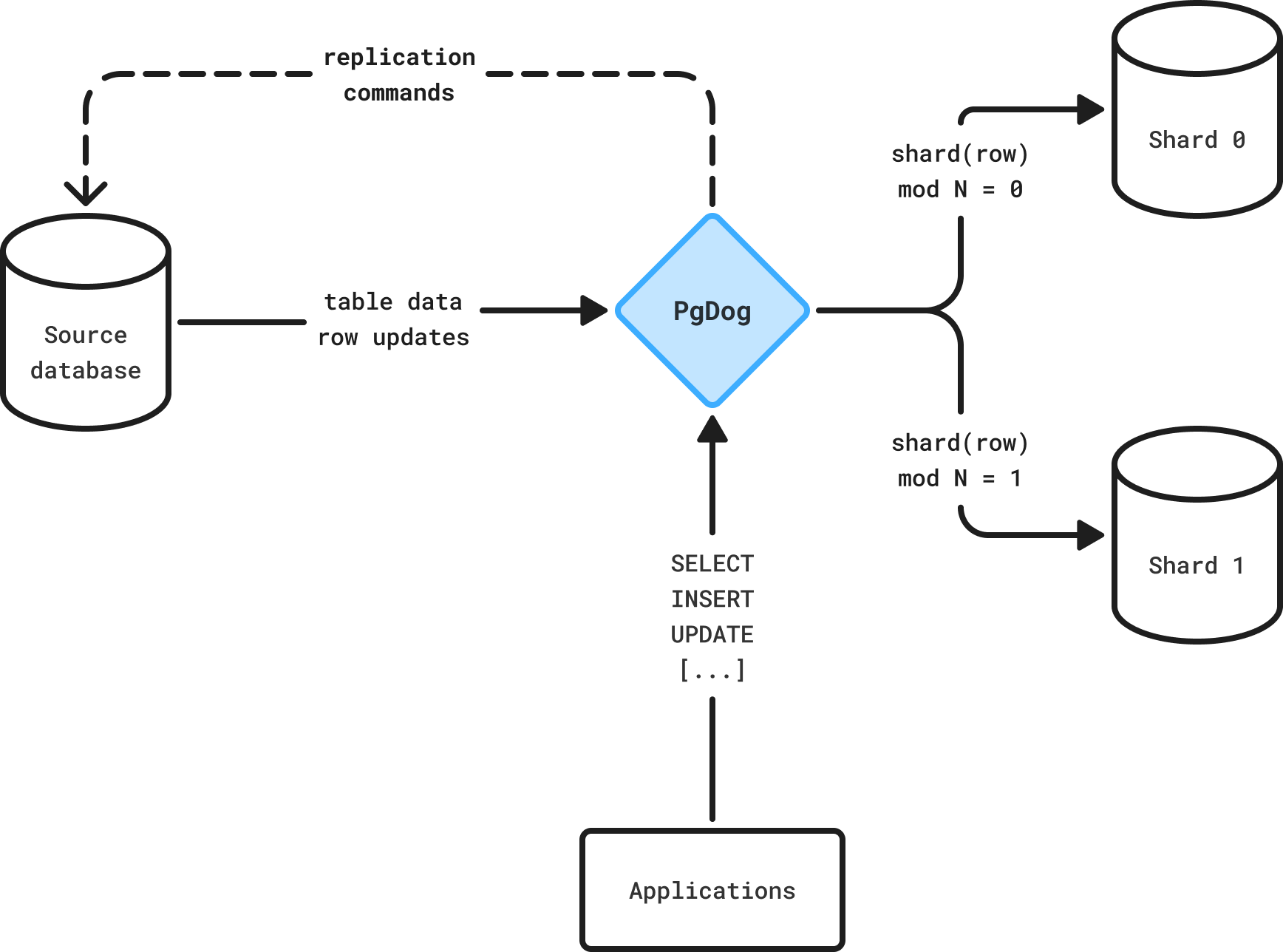
PgDog operates on the application layer of the stack: it speaks PostgreSQL and understands not only the queries sent by applications but also the logical replication protocol used by the server. This allows it to automatically route queries while moving data between machines to create more capacity.
This documentation provides a detailed overview of all PgDog features, along with reference material for production operations.
Read more
Features
Read more about PgDog features like load balancing, supported authentication mechanisms, TLS, health checks, and more.
Administration
Learn how to operate PgDog in production, like fetching real-time statistics from the admin database or updating configuration.
Installation
Install PgDog on your Linux server or on your Linux/Mac/Windows machine for local development.
Configuration
Reference for PgDog configuration like maximum server connections, number of shards, and more.